Overview - Automate Your Conversations
Mogli Forms are a powerful feature that allows users to gather vast amounts of information from recipients via automated text messaging. They are an easy-to-implement automation that do not require building complex Flows, allowing anyone in your organization to capitalize on seamless data gathering, saving significant time for any team. Form responses are also reportable, allowing users to immediately take the collected data points and use them to support their operations or inform business decisions.
Examples Use Cases:
Mogli Forms & Surveys empower you to create these dynamic and automated text message conversations for a variety of purposes. Below are just a few ways you can leverage them.
Secure Opt-In to Text Messages: Create specific keywords that allow individuals to easily and securely subscribe to your text message communications.
Feedback/Surveys: Gather valuable insights and measure the impact of your initiatives by obtaining feedback on experiences.
Inquiry Forms: Efficiently capture essential information like names, email addresses, and other relevant details to create new records or update existing ones in your system.
Text to Donate: Facilitate charitable giving by creating pre-populated forms that allow recipients to easily make donations via text message.
Appointment Confirmations: Streamline appointment management with automated updates, confirmations, rescheduling options, and cancellations via text.
Text to Case: Gather crucial support case information, assess the urgency of issues, and provide timely support through interactive text conversations.
Form Template Types:
Linear Form Templates: Design straightforward surveys or information-gathering processes where a fixed series of questions is presented to every recipient, regardless of their responses.
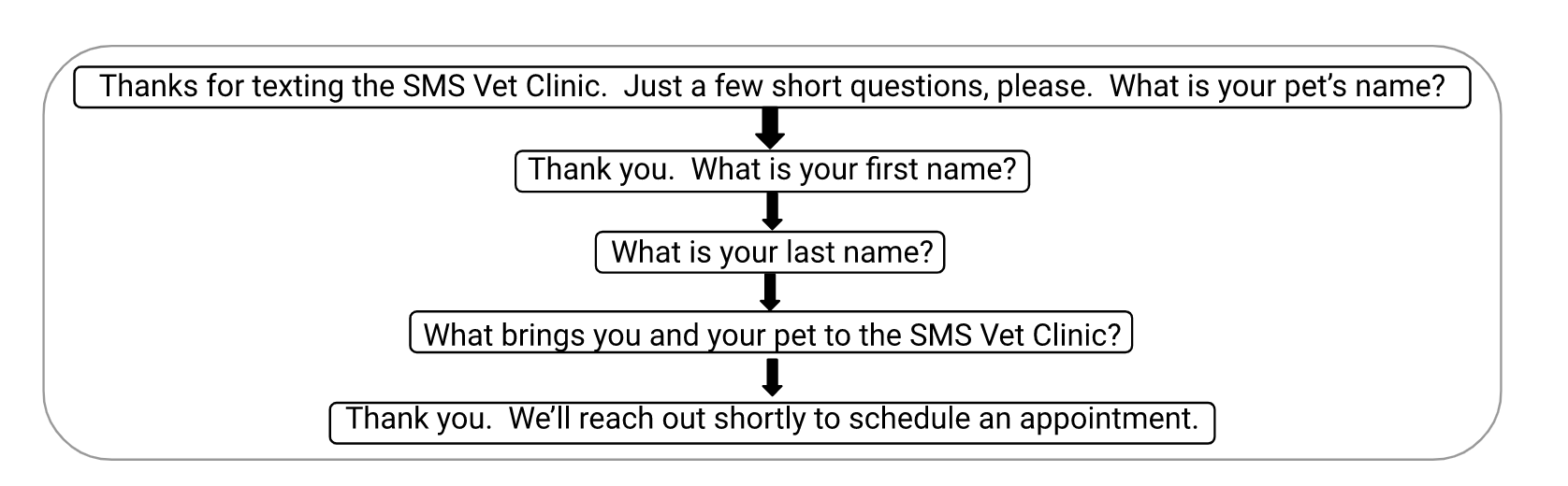
Branching Form Templates: Create more sophisticated and personalized conversations where the flow of questions adapts dynamically based on the recipient's answers, leading them down different paths.
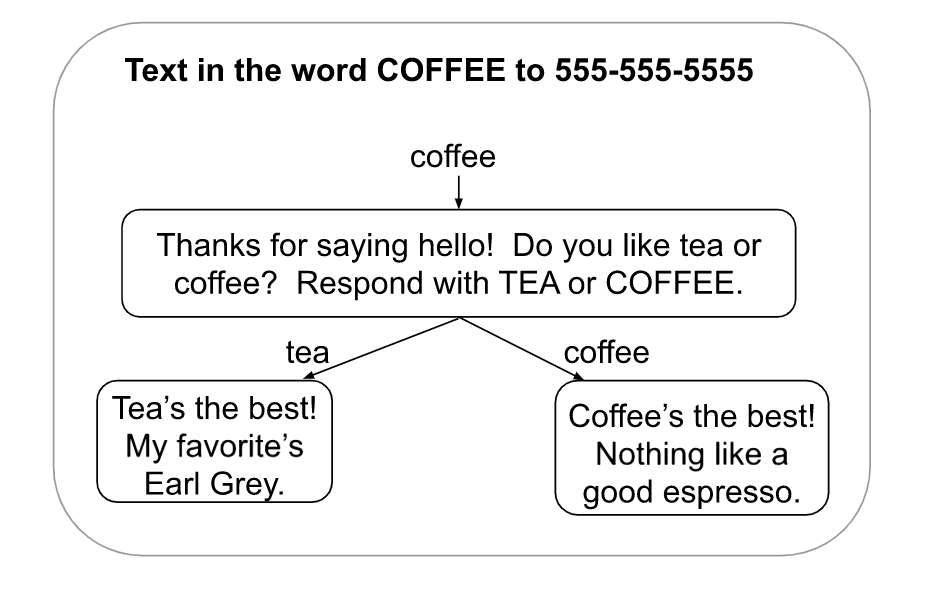
Personalizing Your Forms with Merge Fields:
You can now enhance your Form Templates by incorporating merge fields! To utilize this feature, ensure the desired merge fields are configured within the Mogli Application Settings or the Custom Metadata Type: Mogli Integrated Object.
The standard notation for merge fields is {ObjectAPI.FieldAPI}. Example: {Contact.FirstName}.
For your convenience, legacy merge field notation without the object prefix (e.g., {FirstName}) is also supported.
Important Note: If a specified merge field cannot be found, the merge field notation itself (e.g., {Contact.FirstName}) will be inserted into the message.
Key Consideration:
Updating First Question and SMS Templates: If you modify the first question in a Form Template, you should also update the related SMS Template to keep them consistent. You have the option to edit the current SMS Template or delete it and use the "Create SMS Template" button to generate a new one that matches. Keep in mind that the Form Template Wizard handles this automatically.
Form Template Wizard
Mogli v5.139.1 (Mount Elbert) and later versions offer the Mogli Form Template Wizard, a simple way to create SMS forms within Mogli. This tool simplifies data collection by guiding you through the creation of dynamic and interactive forms for feedback, surveys, client management, and more, all via SMS.
The wizard simplifies form development with a suite of powerful features:
Guided Creation: A step-by-step process simplifies form building, making it accessible for all users.
Flexible Question Types: Design forms with diverse question formats, including multiple-choice, free-text, numeric, and date, to capture varied data.
Dynamic Branching Logic: Implement conditional paths to create adaptive forms that personalize the recipient's experience.
Live Preview: Visualize your form in real-time before deployment, ensuring accuracy and optimal presentation.
Easy Editing: Modify existing forms with ease, directly within the wizard.
Seamless Salesforce Integration: Automatically map responses to Salesforce records, enhancing data management and reporting capabilities.
Benefits and Use Cases:
The Mogli Form Template Wizard is designed to enhance engagement and streamline data collection for a wide range of industries. It empowers businesses in education, healthcare, nonprofits, and commercial sectors to:
Enhance Engagement: Create personalized, interactive forms that capture recipient interest and increase response rates.
Improve Data Accuracy: Automate response mapping to Salesforce, minimizing manual data entry errors.
Streamline Workflows: Reduce the time and effort required to create and manage forms, enabling more efficient operations.
Increase efficiency: Save time with reusable templates and automation options.
This tool is ideal for any organization looking to leverage SMS for effective communication and data gathering.
Configuration:
Before you can start using the Mogli Form Template Wizard, you'll need to complete a quick, one-time configuration:
Go to Setup in your Salesforce environment.
In the left-hand navigation, find and click on Tabs.
On the Tabs page, click the button to create a New Lightning Component Tab.
When prompted to select a Lightning Component, search for and choose Mogli_SMS:formTemplateWizard.
This overview provides a glimpse into the power and versatility of Mogli Forms & Surveys and the intuitive Form Template Wizard. For detailed instructions on creating and managing forms, please refer to the following guides: