A new Apex invocable method has been added to the Mogli managed package, designed to facilitate various bulk message customizations within Flows. This method allows for greater flexibility and control over large-scale SMS campaigns.
The invocable method includes the following variables, which can be configured within your Flow:
Campaign ID
Report ID
Recipients
Message Text
Mogli Template ID
Gateway ID
Scheduled Delivery
Question Template ID
Content Document IDs
Twilio Template ID
Locating the Action
| Navigate to the list of Actions in flow and select the Mogli SMS folder |
| Locate the Action in the folder called ‘Send Bulk Message’ (apex-BulkMessageInvocable). |
.png)
.png)
Adjusting the Input Variables
The method includes several Input Variables. While none of the variables are required, a combination of variables must be set in order for the method to send successfully.
Specify message recipients
A value must be provided for one of the following three variables: Campaign Id, Report Id and Recipients.
If you provide more than one of the recipient variables (Campaign Id, Report Id, or Recipients), only the first one will be processed. The system evaluates them in the following order of precedence: Campaign Id, then Report Id, and finally Recipients.
Campaign ID: Supplying a Campaign ID will generate an outgoing message for each Campaign Member associated with that Campaign when the Flow executes. Recipients without a Mogli Number or those who have opted will be automatically excluded, mirroring the behavior of sending to a Campaign via the Bulk Send Lightning Page.
Report ID: providing a Report ID, an outgoing message will be created for each row in the Report at the time of Flow execution. The Report's first column must contain the Record Id of a Mogli Integrated Object; otherwise, the send will fail. As with Campaign sends, individuals without a Mogli Number or who have opted out will be excluded. This behavior and its limitations are consistent with sending to a Report via the Bulk Send Lightning Page.
Recipients: This method offers enhanced flexibility for more customized bulk message sends. Further details on creating bulk message recipients can be found here.
Specify the message’s text
The message's text is the second requirement. This can be handled by either the Message Text or Mogli Template ID variables.
If both the Message Text and the Mogli Template ID are provided, the Message Text will take precedence over the Text value of the Mogli Template.
Message Text: Using Message Text is the most straightforward method to provide the text of the message, and merge fields can be used in message text.
Mogli Template ID*: providing a Mogli Template ID uses the Text of the Mogli Template to set the text of the bulk message.
Field Precedence
Message Text + Mogli Template ID: If both the Message Text and the Mogli Template ID are provided, the Message Text will take precedence over the Text value of the Mogli Template.
Remaining Variables
The remaining variables are optional, and do not need to be provided in order for the bulk message to be sent.
Gateway ID: To set the gateway of all the bulk messages, provide a Gateway ID. If excluded, the gateway is determined by the related record's Default Gateway or when not provided there, the Default Gateway in Mogli Settings.
Scheduled Delivery: To schedule bulk messages to send at a future date and time, provide the Scheduled Delivery date and time. When not provided, messages are created in the Queued status and sent immediately.
Twilio Template ID*: If the bulk messages are being sent via WhatsApp using a specific content template, provide the appropriate Twilio Template ID. When not provided, the Twilio Template Id can be inherited from a indicated Mogli Template ID.
Question Template ID: To initiate a Mogli Form, provide the Question Template ID of the first question of the desired Mogli Form Template. When not provided, the Question Template Id can be inherited from the Mogli Template.
Content Document IDs: Use Content Document IDs to supply a collection of Ids for Content Document records to be sent as attachments. Multiple attachments are supported. When not provided, a single Content Document Id can be inherited from the related Files of the Mogli Template.
Field Precedence
Twillio Template ID + Mogli Template ID: If the Twilio Template ID and a Mogli Template ID are provided and the related Mogli Template includes a Twilio Template Id, the Twilio Template Id provided takes precedence over the value on the related Mogli Template.
Question Template ID + Mogli Template ID: If the Question Template ID and a Mogli Template ID are provided and the related Mogli Template includes a Question Template ID, the Question Template Id provided takes precedence over the value on the related Mogli Template.
Content Document ID + Mogli Template ID: If Content Document IDs are provided in addition to a Mogli Template ID that includes a related File, the Content Document Ids provided take precedence over the Files of the related Mogli Template.
Output Variables
The Bulk Send Action returns up to three different variables, depending on the outcome: Has Error, Batch Group ID and Error Message.
Has Error: The action will always return a Boolean value in Has Error. It will return FALSE when the bulk message is sent or scheduled successfully. If any error occurs, it will return TRUE.
Batch Group ID: Upon successful execution, the Batch Group Id is returned. This Id is also populated on all corresponding Mogli Message records that are created.
Error Message: Error Message will display details about any errors that occur. These errors may stem from problems with the input variables or the bulk send process.
Creating Bulk Message Recipients for the New Bulk Send Action in Flow
The ability to send to a collection of recipients is included in the new Bulk Send Action. This provides enhanced flexibility for more customized bulk sends. Rather than requiring a Campaign or Report, recipients can be defined by a collection curated within Flow.
A Bulk Message Recipient is an Apex-Defined Class that includes the following properties:
ID
ObjectName
Phone
DefaultGatewayID
The Bulk Send Action accepts a collection of recipients using the Recipients variable. The collection uses a custom Apex-Defined Class named Bulk Message Recipient to define a recipient.
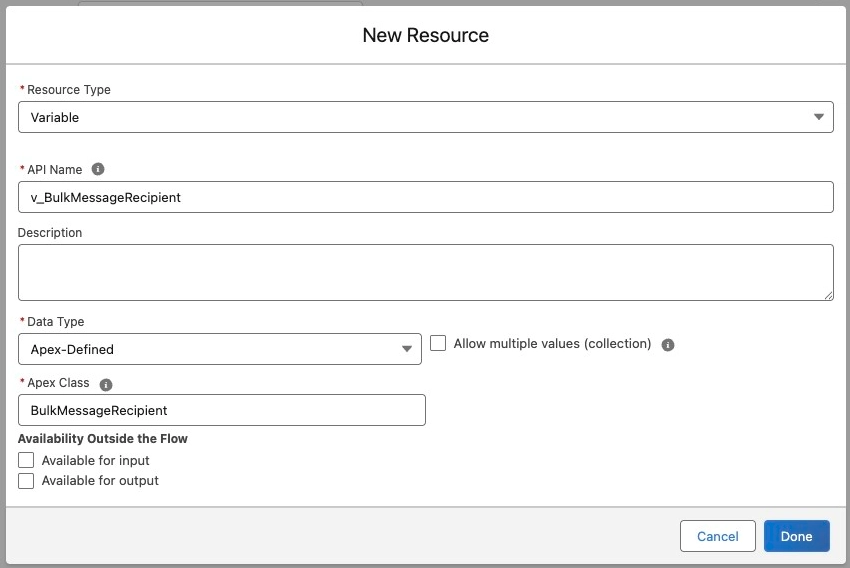
When building the collection, first a variable must be created to define an individual Bulk Message Recipient.
| The Data Type must be Apex-Defined and the Apex Class selected should be BulkMessageRecipient. |
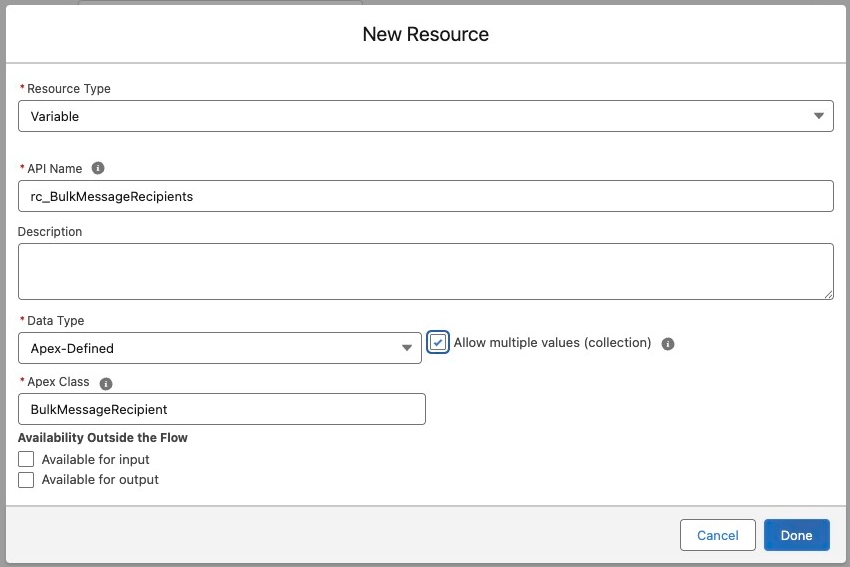
| Define a collection variable for all the Bulk Message Recipients. Again, the Data Type must be Apex-Defined and the Apex Class selected should be BulkMessageRecipient. However, this time, Allow Multiple Values is checked to create the collection. |
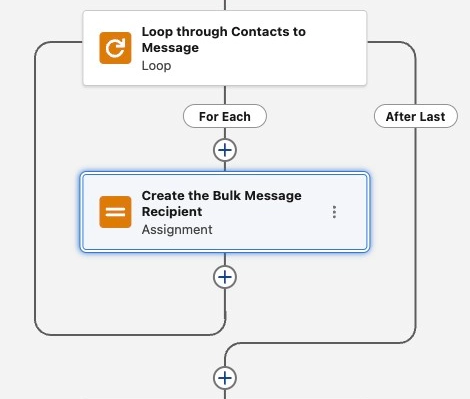
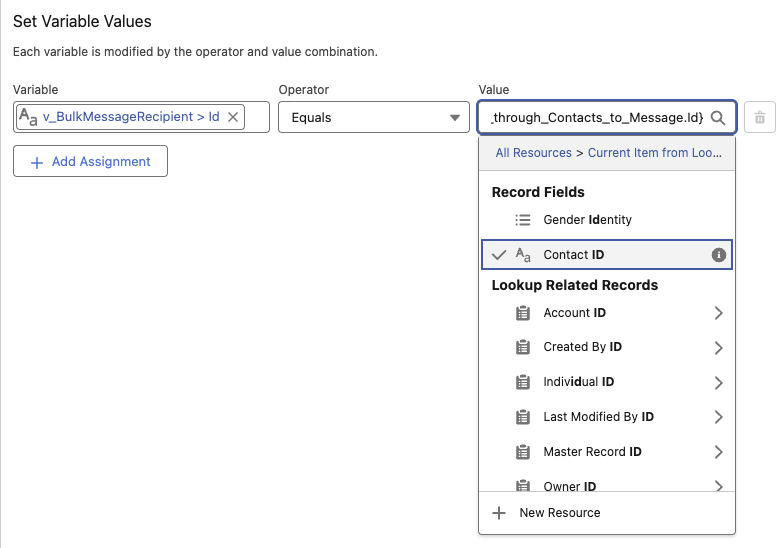
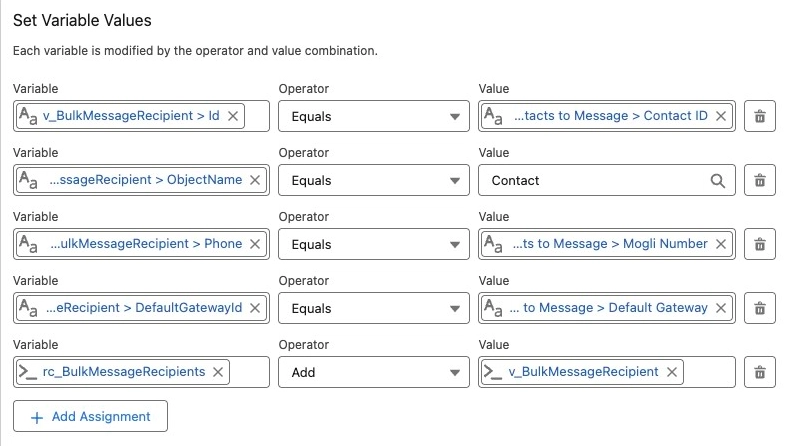
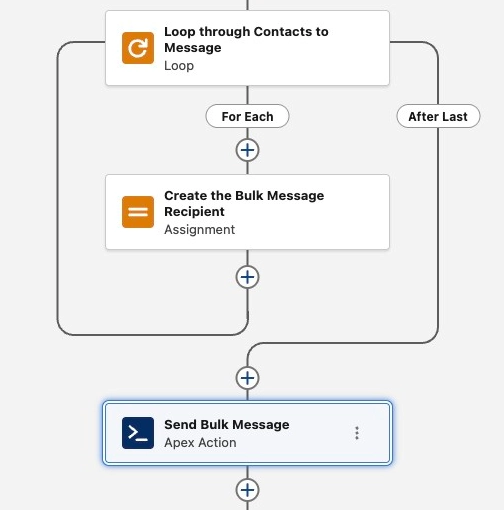
| To walkthrough an example of using a Bulk Message Recipient collection, a record collection of Contacts will be used. The most common approach to populating the collection would be within a loop. Within the loop, an Assignment set is added to create the Bulk Message Recipient and add it to the collection. |
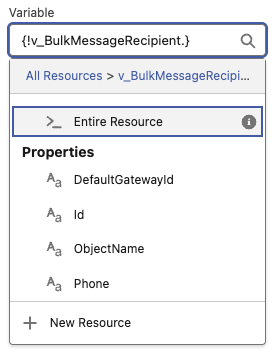
| On the Bulk Message Recipient Apex-Defined Class, there are four different properties: ID, ObjectName, Phone and DefaultGatewayId. |
| On the Bulk Message Recipient Apex-Defined Class, there are four different properties: ID, ObjectName, Phone and DefaultGatewayID. |
| Also required is the ObjectName. This is the Object Api Name of the related record. Since the example uses a collection of Contacts, the ObjectName is set to Contact. |
| |
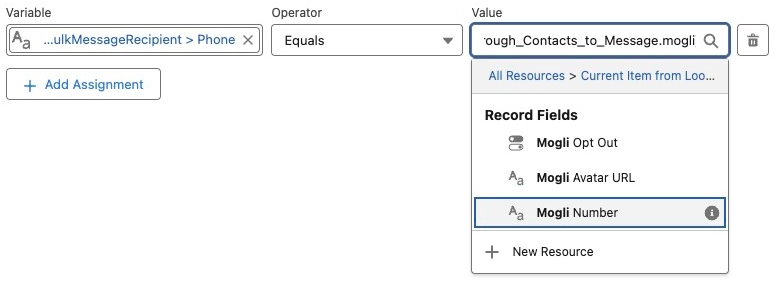
| The last required property is Phone. As it suggests, this is the phone number to send the message to and must be formatted appropriately. For the example, Phone is set to the Mogli Number of the Contact. |
| |
| The fourth property, DefaultGatewayId, does not have to be set. It can be used to define a record-specific gateway, but when not provided, it will defer to the gateway defined in the Bulk Send Action or the Default Gateway provided in Mogli Settings. Continuing with the Contact example, DefaultGatewayId is set to the Default Gateway of the Contact. |
| To complete the Assignment step of the walkthrough, the Bulk Message Recipient is added to the collection. |
| Continuing with the example, the Send Bulk Message action is added after completing the creation of the Bulk Message Recipient collection. |
| In the Send Bulk Message action, the Recipients variable is set to the record collection. Now when executed, the Flow will send the message to each record in the collection, using the information provided for each recipient. |