Obtaining Consent
You must receive explicit written consent before sending SMS messages. That consent must be documented and saved, otherwise you risk fines of $500-$1500 per message.
Opt-in
Opt-in consent can be obtained in a few ways:
|
|
|---|---|
|
|
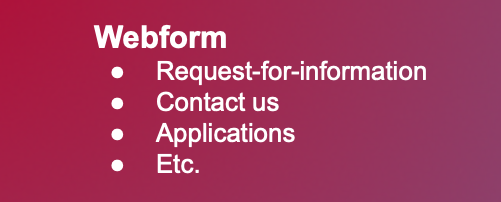
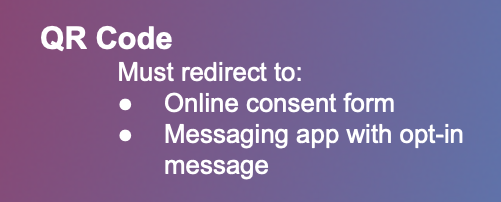
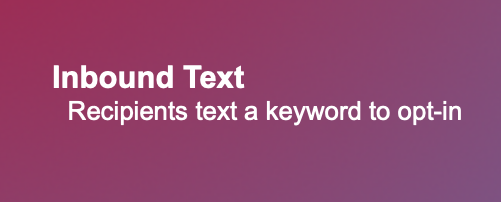
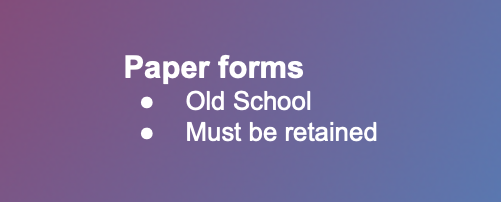
Remember, the phone number field on website opt-in forms must be optional, as mandatory fields are now considered forced opt-ins.
Example Opt-in Consent Language
Standard
By [method of consent, e.g., clicking checkbox, submitting this form, etc.], you agree to receive text messages from [sending company name] related to [use case]. Message & data rates may apply. Message frequency varies. Carriers are not liable for delayed or undelivered messages. Reply HELP for help [or specify an alternative method for end recipients to receive help] and STOP to cancel. View Terms of Service and Privacy Policy [hyperlink policies].
Nonprofit
By [method of consent, e.g., clicking checkbox, submitting this form, etc.], you agree to receive text messages from [sending company name] related to [use case]. [Donations may be solicited / Donations will not be solicited] (choose one). Message & data rates may apply. Message frequency varies. Carriers are not liable for delayed or undelivered messages. Reply HELP for help [or specify an alternative method for end recipients to receive help] and STOP to cancel. View our Terms of Service and Privacy Policy [hyperlink policies].
Marketing Use Case
If you use SMS for promotional or direct marketing—even as a sub-use case under the Mixed campaign type—this must be specified in the opt-in consent statement. Please use the following suggested language:
By [method of consent, e.g., clicking checkbox, submitting this form, etc.], you agree to receive promotional and informational text messages from [sending company name] at the number provided, including messages sent by autodialer. Consent is not a condition of purchase. Message & data rates may apply. Message frequency varies. Carriers are not liable for delayed or undelivered messages. Reply HELP for help [or specify an alternative method for end recipients to receive help] and STOP to cancel. View Terms of Service and Privacy Policy [hyperlink policies].
Mixed use with Marketing
If your use case is standard or non-profit, but also includes promotional and/or direct marketing, then you will need to include two separate checkboxes where you gather SMS opt-in consent.
Example Language
Checkbox 1 (non-marketing) By checking this box, you agree to receive text messages from [sending company name] related to [non-marketing use case description]. Message & data rates may apply. Message frequency varies. Carriers are not liable for delayed or undelivered messages. Reply HELP for help [or specify an alternative method for end recipients to receive help] and STOP to cancel. View Terms of Service and Privacy Policy [hyperlink policies].
Checkbox 2 (promotional/marketing) By checking this box, you agree to receive promotional text messages from [sending company name] at the number provided, including messages sent by autodialer. Consent is not a condition of purchase. Message & data rates may apply. Message frequency varies. Carriers are not liable for delayed or undelivered messages. Reply HELP for help [or specify an alternative method for end recipients to receive help] and STOP to cancel. View Terms of Service and Privacy Policy [hyperlink policies].
Opt-out
It's crucial to respect your recipients' preferences. If someone hasn't responded to your initial message, treat that as an implied opt-out.
Recipients can explicitly opt out of your messages at any time by texting one of the following keywords: STOP, QUIT, UNSUBSCRIBE, OPT-OUT, or CANCEL.
Upon opting out, our messaging partner automatically sends a confirmation message. This message confirms their opt-out status and provides clear instructions on how to opt back in by texting START, YES, or UNSTOP.
Important Notes for Salesforce Users:
While our partner's automated opt-out confirmation message isn't visible in Salesforce, the customer's "STOP" or "START" message will appear.
Attempting to send a message to someone who has opted out (from the same number they opted out of) will result in non-delivery and an error on the SMS record.
To maintain accurate communication records and avoid sending undeliverable messages, we strongly recommend implementing a process to track all opt-outs within Salesforce.
Configuring Opt-Ins and Opt-Outs
Mogli offers two robust methods to track recipient opt-in and opt-out preferences, helping you maintain compliant and effective communication.
Global Opt-Outs
The Mogli Opt Out checkbox provides a comprehensive way to manage global opt-outs. When this checkbox is selected on a contact's record, Salesforce users will be prevented from sending any outbound SMS messages to that individual. To ensure compliance from the start, we recommend performing a mass update using the Data Import Wizard or Data Loader to check the Mogli Opt-Out checkbox for all recipients initially. This ensures no messages are sent until recipients have explicitly opted in.
You have the flexibility to manage this checkbox manually, or you can automate the process. By setting up our 10-minute Flow, the Mogli Opt Out checkbox will automatically update (checking or unchecking) based on keywords recipients use to opt in or out. For instance, you can configure the Flow to automatically uncheck the checkbox when someone texts in keywords like "START," "SUBSCRIBE," or "OPT IN," or any other terms you define. . When the Mogli Opt Out checkbox is checked, any attempt to send a message will be blocked, and a yellow banner will appear in the Conversation View, though historic messages remain visible.
Find out more about automations
Subscription Opt-Outs
Available in Mogli SMS 5.49.14 and later, Subscription Opt-Outs offer a more granular level of control. This feature allows you to manage opt-in and opt-out preferences at the gateway (or sending phone number) level. This means recipients can opt into specific messaging streams associated with a particular phone number, and you can even set unique opt-out and opt-in keywords for each gateway, providing tailored control over their subscriptions.
Privacy Policy
When collecting phone numbers for messaging campaigns, your Privacy Policy must be easily accessible and clearly visible near the point where the consumer enters their number. Carriers rigorously check the website linked by your Brand to ensure this placement.
Crucially, your Privacy Policy must explicitly state that end-user information will NOT be shared or sold to any third parties or affiliates. This restriction includes, but isn't limited to, sharing data for marketing purposes, lead generation, or third-party analytics. In essence, the policy must clearly confirm that all end-user information is protected, encompassing even voice and political use cases.
You can also feel free to copy/download the compliant privacy policy and terms of use/terms & conditions located below, and edit them to match your Brand:
Terms & Conditions
Your Terms & Conditions should also be prominently displayed where consumers provide their phone number. These terms must include the following vital elements:
Program (Brand) Name: Clearly identify who is sending the messages.
Message Frequency Disclosure: Inform users how often they can expect to receive messages (e.g., "Msg freq varies," "2 msgs/wk").
Product/Service Description: Briefly explain what the messages will be about.
Customer Care Contact Information: Provide a clear way for users to get support (e.g., phone number, email, or website link).
Opt-Out Information: Clearly state how users can stop receiving messages (e.g., "Text STOP to opt out").
"Message and data rates may apply" disclosure: This is a mandatory notice.
It's critical that your Terms & Conditions do not contradict your Privacy Policy or the stated opt-in process. For instance, the terms cannot state that user information will be shared. If the consumer is opting into SMS via a specific phone number (like a 10DLC or Toll-Free Number), the Terms & Conditions must clearly state that both opt-in and opt-out occur through that specific number. This ensures consistency between your call to action (CTA), Terms & Conditions, and Privacy Policy.
Carrier Filtering
Ignoring carrier regulations can jeopardize SMS campaigns before they even begin. These regulations help protect consumers, so you must consider them when defining your message strategies and drafting your SMS.
Carrier filtering is the action phone carriers like AT&T, Verizon, and T-Mobile take to block the delivery of text messages that are deemed inappropriate or spammy from a specific number or business. While carrier filtering can be inconvenient for legitimate businesses, it’s essential for the integrity of the SMS industry. If message filtering didn’t exist, spammers and scammers could send as many unwanted messages as they want without consequences. This would erode consumers’ trust in text messaging, and businesses using SMS marketing responsibly would see a decrease in the channel’s effectiveness. Typically, customer complaints activate messaging filters, with the carrier immediately blocking future messages from the reported number.
Carriers also filter messages to:
Ensure SMS marketing compliance with carrier policies, as well as state, local, or country-specific regulations.
Enforce SMS marketing rules and regulations and protect their customers from unsolicited or unwanted messages that are abusive, fraudulent, or contain questionable content.
Lower the risk of dissatisfied wireless customers taking legal action and seeking damages or moving to a different carrier.
How Carrier Filtering works
Carriers are super secretive about their message filtering systems to prevent spammers from learning how to dodge these protections, but there are a few methods we do know about. Unlike email, where the recipient can choose to block email addresses, mobile carriers don’t take user preferences into account when blocking a message. So, you have to be extra careful when sending text messages to customers. Each wireless carrier has its preferred method of message filtering. Some of these SMS spam filters use a list of keywords that prevent text messages from getting through. Others use advanced machine learning filters that protect customers from unwanted messages in real-time.
🙄 Avoid spammy words and special characters
There’s no official list outlining common spam trigger words/topics, but certain words and phrases are considered spammy and more likely to trigger filtering.
Important information regarding
Information you requested
Requires initial investment
Social security number
Check or money order
Save up to
Save big money
Billions
Money back
$$$
Free $$$
Free preview
Free access
Free trial
Free money
Risk-free
100% satisfied/free/more
Human growth hormone
You will not believe your eyes
Cure baldness
This won’t last
You have been selected
Take action
Limited time
Don’t delete
The risk of carrier filtering increases when texts contain special characters (like % and #), emojis (😭), and words in all caps.
🍬 Keep texts short
Whenever possible, keep your text messages short and sweet, not long and rambling.
While you can send text messages up to 1,600 characters, there are few (if any) times when a text message would warrant using that many characters. One to three sentences are typically sufficient.
🔗 Use links wisely
To avoid getting their messages flagged as spam when sharing links:
Use a branded shortened link. Don’t forget, if you use a popular unbranded URL shortener, such as bit.ly, you can expect to be automatically blocked, as these services are often used by spammers to disguise suspicious links.
Never end messages with a link. Here's an example of a way to include links in your messages: “Jane, you can edit your profile here [link to page]. We look forward to staying in touch with you.”
Don’t send naked links. A naked link is a link that does not include “https://” before the link. The best practice is to always send links that begin with https://.
Sending links doesnt have to be complicated.
Mogli URL seamlessly integrates with Mogli SMS which enables users to effortlessly create and insert custom short URLs into messages, configure custom domains to ensure brand recognition and SMS carrier compatibility, and provide engagement analytics which includes personalized click tracking. Learn more.
🪩 Personalize your content
Generic and repetitive messages that are sent to hundreds or thousands of people at once tend to get caught up in SMS filters.
While registering your numbers with carriers reduces the risk of this causing filtering, you want to ensure that your messaging is offering consistent value and is not repetitive. This can be done using features like merge fields to personalize their text messages and sound less robotic.
✅ Get explicit permission to text your contacts
Before sending a single text, you need to receive consent (also called an opt-in) from your recipients.
Even if you’ve already collected a client’s information for another purpose, like sending order updates, you should still ensure that the recipient wants to receive messages via text.
Not only does this help keep your messages from being blocked, but it’s required by the Telephone Consumer Protection Act (TCPA), which protects people from automated and unwanted messages.
🚫 Respect opt-in and opt-out requests
The CAN-SPAM Act is one of the more well known SMS marketing laws. It regulates how you can send text messages and to whom.
This act gives recipients the right to opt out of business communications with a specific business and sets penalties if the business doesn’t respect their request.
Here are some of the CAN-SPAM regulations:
Be upfront about what you’re selling and asking from your clients.
Mention the company you represent.
Follow SMS best practices and let recipients unsubscribe from your texts whenever they want to.
Forbidden SMS Content
SMS is a highly regulated channel and is subject to stringent rules, regulations, and carrier requirements. Certain message content is prohibited and wireless carriers will reject SMS and MMS messages containing prohibited content by default. Other use cases are subject to additional requirements, like age-gating procedures. If your business sends messages containing any of the types of prohibited content listed below, SMS may not be the appropriate channel to reach your customer base.
Please note that these forbidden use cases are not only related to the content of the message but also the business type itself.
The following message categories are prohibited for SMS and MMS:
High-risk financial services
Payday loans | Short term high-interest loans | Third-party auto loans | Third-party mortgage loans |Student loans | Cryptocurrency
“Third-party” means originating from any party other than the one which will service the loan.
SMS messages featuring financial investment advice or tips, as well as information on loans and refinancing options, are prohibited. Carriers also prohibit messages with links to donation sites.
Legitimate financial institutions may use SMS in accordance with certain restrictions, and often leverage text alerts for suspicious card activity, appointment reminders, and other transactional messages.
Third-party lead generation services
Companies that buy, sell, or share consumer information
Buying, selling, or sharing of consumer data is strictly prohibited. The business that obtained consent is the only business authorized to send SMS.
“Cold” outreach is the solicitation of business from potential customers who have had no prior contact with the business and is strictly prohibited.
Debt collection or forgiveness
Third-party debt collection | Debt consolodation | Debt reduction | Credit repair programs
Almost all debt consolidation and forgiveness efforts are prohibited for SMS and MMS.
Regarding debt collection, the business owed the debt can send payment reminders to late payers, personalized messages with account details, and follow up on payment confirmations. However, a third party cannot attempt to collect the debt for you via SMS and MMS.
"Get rich quick” schemes or Multi-level marketing
Risk investment opportunities |“Get rich quick," "build your wealth," and "financial independence" | Multi-level marketing | Network marketing | Pyramid schemes
Multi-level marketing (MLM) products, services, or content commonly associated with unsolicited commercial messages (spam) are prohibited.
This is different from outreach about employment as a result of compliant opt-in practices, messages from brokerages to their members, investment news alerts, or other investment-related messages.
Illegal Substances
Marijuana/Cannabis | CBD/THC | Prescription drugs | Vaping
Cannabis is federally illegal in the United States. Cannabis businesses will not be permitted to use SMS/MMS messaging in the US, regardless of message content.
CBD is federally legal, but is not legal in some US states, so US carriers do not permit messaging related to CBD.
Offers for drugs that cannot be sold over-the-counter in the US/Canada are forbidden.
Gambling
Casino apps | Gambling websites
While gambling traffic is prohibited on Toll Free, it is allowed on Short Code, or Long Code, as long as proper age gating procedures are in place.
S.H.A.F.T.
Sex | Hate speech or profanity | Alcohol | Firearms and depictions of violence| Tobacco (including vaping and illegal or illicit drugs)
SHAFT is a handy acronym to help you remember types of content which is either forbidden or subject to special rules.
While Tobacco traffic is prohibited on Toll Free, it is allowed on Short Code, or Long Code, as long as proper age gating procedures are in place.
Firearms and Alcohol traffic is allowed on Toll Free, Short Code, and Long Code, as long as proper age gating procedures are in place.
Vaping-related traffic is prohibited.
Non-Compliance Fines
T-Mobile is now enforcing non-compliance fines for messages containing prohibited content. If T-Mobile detects any messages that violate the tiers listed below, they will issue a non-compliance fine and Mogli’s messaging partners will immediately block the offending messages.
Because, sending this type of content breaches Mogli’s Acceptable Use Policy, Mogli will pass these fines on to the sending organization. These fines include, but are not limited to:
Tier 1: $2,000: phishing (including simulated phishing sent for security testing or similar purposes), smishing, and social engineering
Social Engineering is a technique used to manipulate someone into sharing private information, like passwords or credit card numbers.
Tier 2: $1,000: illegal content (content must be legal federally and in all 50 states)
Tier 3: $500: all other violations in commercial messaging including but not limited to, SHAFT (sex, hate, alcohol, firearms, and tobacco) that do not follow federal and state law and regulations (e.g. age-gate).
These non-compliance fines apply to violations across any A2P messaging product (SMS/MMS short code, toll-free, and 10DLC) that are sent to your contacts over the T-Mobile network.
This information is not legal advice.
You should consult with your legal counsel to make sure that your SMS program and message content comply with applicable laws.