Blocking unwanted incoming messages is accomplished through two separate flows to both prevent a notification and delete the message. This is useful if a client is receiving unwanted spam or inappropriate messages.
Option 1: Update the Status to Prevent Notification
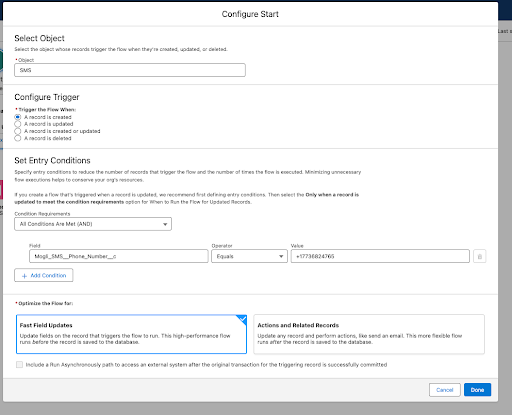
This flow is a Record-Triggered Flow on the SMS Object that is triggered when A record is created. It's optimized for Fast Field Updates.
Configure Start
Select Object: SMS.
Configure Trigger: A record is created.
Set Entry Conditions:
Condition Requirements: All Conditions Are Met (AND).
$\text{Field: Mogli_SMS__Phone_Number__c}$.
Operator: Equals.
Value: the number you want to block
Optimize for: Fast Field Updates.
Click Done.
|
|
|
|---|
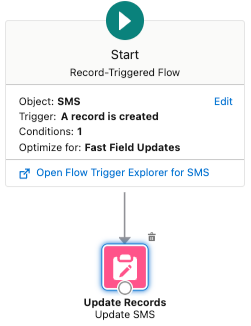
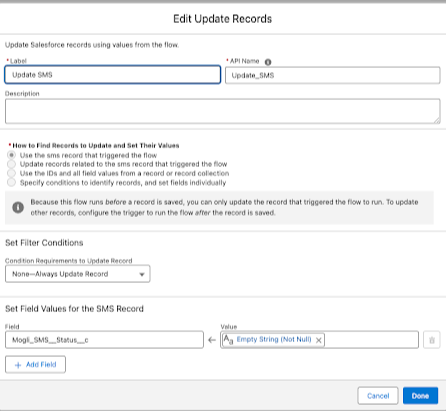
Update Records (Update SMS)
Label: Update SMS.
API Name: $\text{Update_SMS}$.
How to Find Records to Update and Set Their Values: Select Use the SMS record that triggered the flow.
Set Filter Conditions: Condition Requirements to Update Record: None—Always Update Record.
Set Field Values for the SMS Record:
$\text{Field: Mogli_SMS__Status__c}$.
Value: Empty String (Not Null).
Click Done.
Option 2: Delete the Message Asynchronously
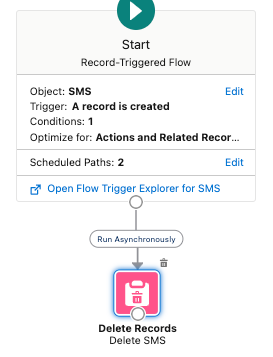
This flow is also a Record-Triggered Flow on the SMS Object triggered when A record is created. It is optimized for Actions and Related Records and runs the deletion Asynchronously.
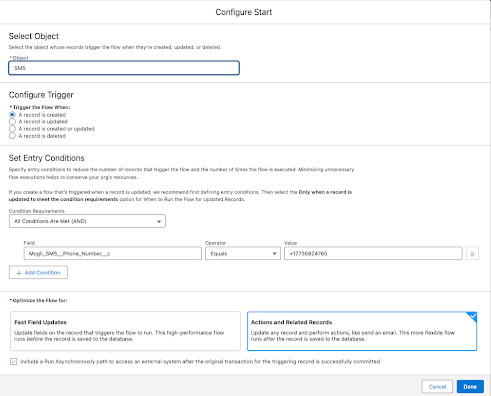
Configure Start
Select Object: SMS.
Configure Trigger: A record is created.
Set Entry Conditions:
Condition Requirements: All Conditions Are Met (AND).
$\text{Field: Mogli_SMS__Phone_Number__c}$.
Operator: Equals.
Value: the number you want to block.
Optimize for: Actions and Related Records.
Check the box to Include a Run Asynchronously path to access an external system after the original transaction for the triggering record is successfully committed.
Click Done.
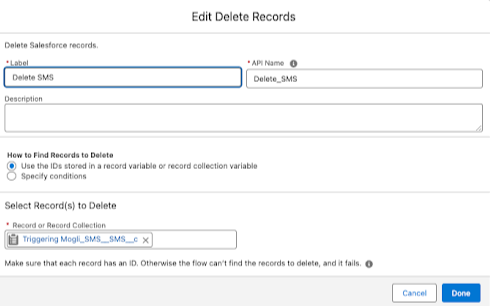
Delete Records (Delete SMS)
Label: Delete SMS.
API Name: $\text{Delete_SMS}$.
How to Find Records to Delete: Select Use the IDs stored in a record variable or record collection variable.
Select Record(s) to Delete: $\text{Triggering Mogli_SMS__SMS__c}$.
Click Done.
|
|
|
|---|