Mogli SMS Release Notes - v5.113.4 (Crestone Peak)
What's New
Real-time message composing insights
Incoming SMS records can be routed through a Connected App
Dedicated Full Access permission set for Community/Experience Cloud Users
Admin user can now turn Mogli-Integrated objects on or off
Resolved Issues
Bug fix for Mogli Integrated Objects with a Master-Detail Relationship
Added restrictions to the Site Guest User for Async Tasks
Bug fix for the Mogli Conversation View opt-out warning banner not updating in real-time
Bug fix for inactive gateways being displayed in Mogli Conversation View picklist
Bug for an issue when creating SMS records that include attached files with long names
Bug fix for a component error when changing record types
Bug fix for Mogli Visualforce page not being scrollable
Bug fix for Mogli URL Save and Insert button
Bug fix for Mogli URL domain creating issues
Bug fix for Mogli Notification issues with Anonymous leads and bulk messages
Bug fix for Attachment field on SMS record not working correctly
Bug fix for Twilio Intelligent Route gateways not displaying message segments
Please reach out to help@mogli.com to check if your Twilio Intelligent Route gateway is set up correctly
Introducing real-time message composing insights!
Enhance your SMS experience with our new real-time message composing insights! As you craft your message, you'll now see immediate information about:
Encoding Type: Understand the character encoding being used for your message.
Character Count: Keep track of the total number of characters in your message.
Segment Count: See an estimate of how many SMS segments your message will be divided into.
Message Channel Instructions and Limitations: Be informed of any specific guidelines or restrictions for your chosen messaging channel.
Informative Tooltips: Access additional details and explanations by hovering over the insights.
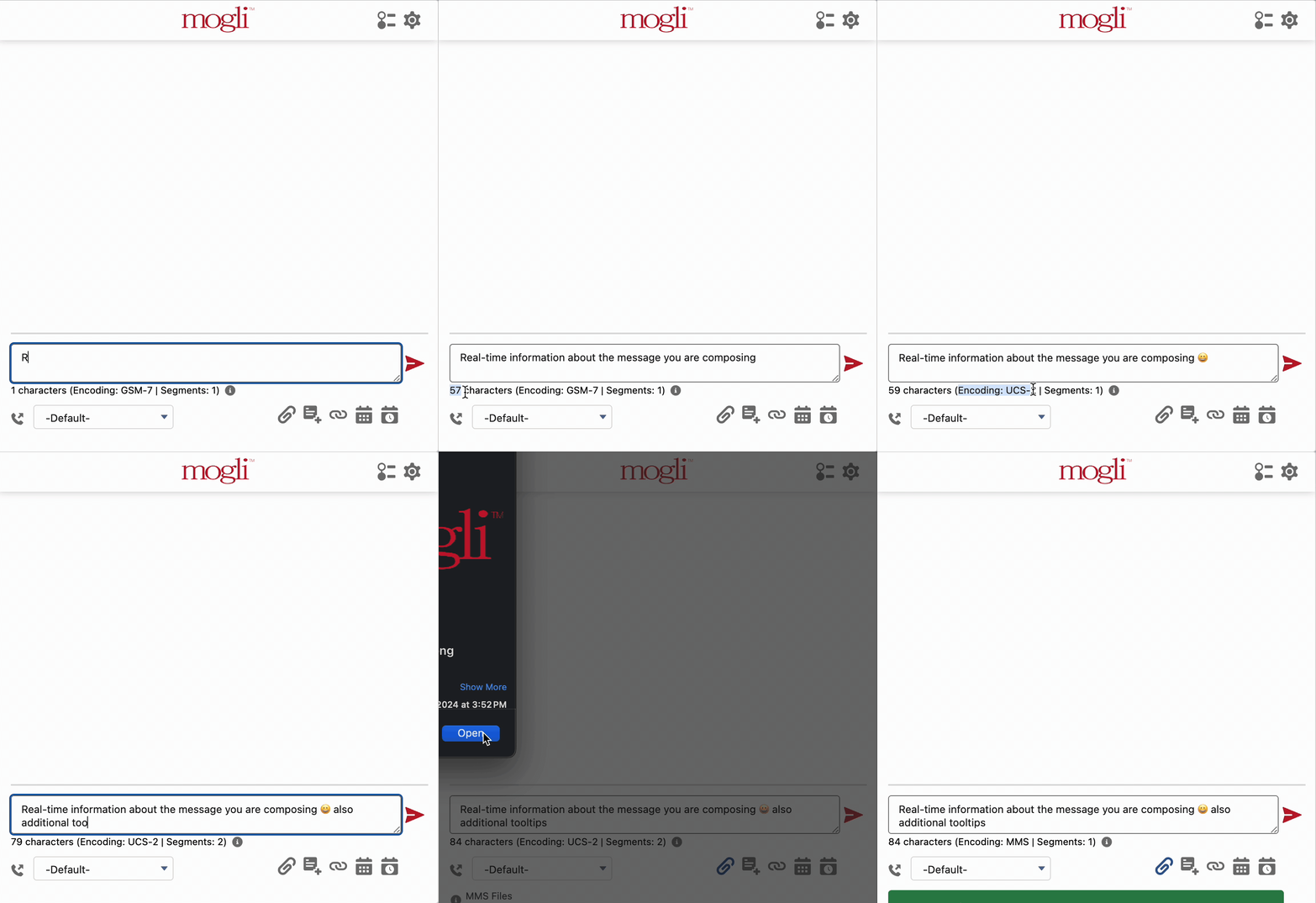
Understanding Charcter and Segment Estimates
The character and segment counts displayed during message composition are designed to provide helpful, real-time feedback. However, it's important to understand that these values are initial estimates. Certain dynamic features are processed after you compose your message and can affect the final character count and the number of segments into which your message is divided upon sending. These factors include:
Merge fields: When you insert a merge field (e.g., {{Contact.Name}}, our system initially counts the literal characters of the merge field syntax (in this example, 16 characters). The actual character count will be determined after the merge field is processed and the specific recipient's information is inserted.
Mogli URLs with Personalized Engagement: If you've enabled personalized engagement for a Mogli URL, a unique 6-character identifier (slug) is generated. During SMS creation, this slug is counted as 7 characters (including the forward slash, e.g., /aBCdEf). This count remains consistent as the slug is generated at the time of SMS creation.
Mogli Scheduling Links with Pre-fill Data: When using Mogli scheduling links with pre-filled information, the initial, longer link (e.g., https://scheduler.mogli.com/booking/mike-45, counted as 43 characters) is shown during message composition. Upon sending, this link is automatically shortened (e.g. https://scheduler.mogli.com/u/aBcdEf, which is 36 characters.) The final segment calculation will be based on this shorter, actual URL.
Toll-Free Numbers: When an SMS exceeds the single-segment character limit, it is split into multiple segments for delivery. The maximum number of characters that can fit into a single segment has a slight difference (1 character) between standard 10-digit long code numbers and toll-free numbers. Our real-time segment counter currently assumes all messages are being sent from a standard 10-digit long code and does not factor in this minor difference when toll-free numbers are used.
Segment Lengths:
GSM-7 Encoding (Standard Characters): Messages exceeding 160 characters are split into segments containing a maximum of 153 characters when sent from a 10-digit long code and 152 characters when sent from a toll-free number.
UCS-2 Encoding (Special Characters): Messages containing one or more special characters and exceeding 70 characters when sent from a 10-digit long code and 66 characters when sent from a toll-free number.
Initial vs. Verified Segment Value
This feature also provides insight into how segment counts are recorded:
When an SMS record is initially created and sent, the segment count displayed at that moment is automatically saved in the SMS.Message Segments field. This represents the initial estimate.
After the message is successfully processed and delivered by our messaging partner, they send a status update back to Salesforce. This update typically includes the actual number of segments the message was divided into for delivery.
At this point, the SMS.Message Segments field in Salesforce is updated with this verified segment count received from the messaging partner.
Important Exception: When utilizing Twilio intelligent routing gateways, the SMS.Message Segments field will retain the initial segment count calculated during message creation and will not be updated with the potentially different segment count reported by Twilio.
By keeping these considerations in mind, you can effectively utilize the real-time message composing insights while understanding the potential variations in final character and segment counts.
Message character and segment counting and GSM-7/UCS-2/MMS encoding recognition.

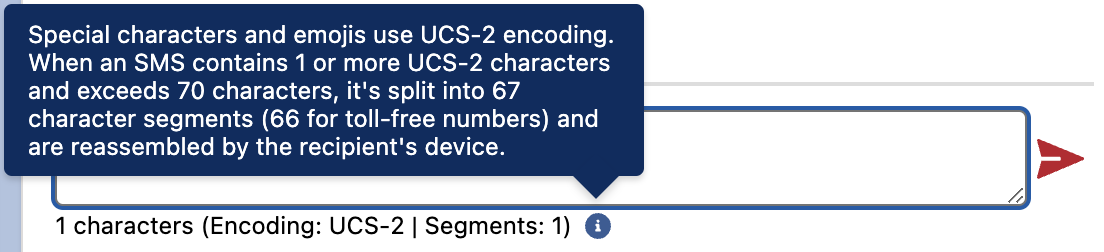

Message Length Information
Twilio: 1,600 characters

Telnyx: 10 segments

WhatsApp 24-Hour Window Information
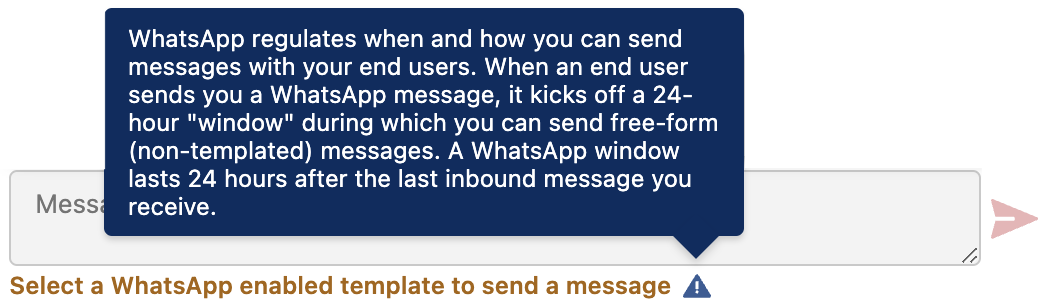
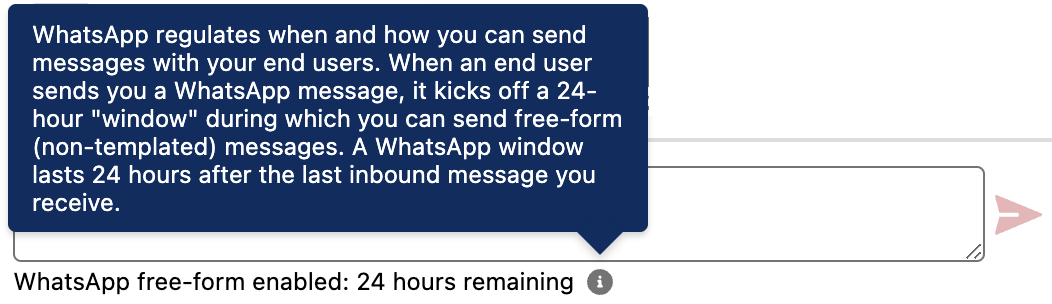
Mogli Voice Instructions

Enhanced Security and Tracking for Incoming SMS Records
We're excited to introduce a more secure and transparent method for processing incoming SMS messages within your Salesforce environment!
Previously: Incoming SMS Records were created by the "SMS Site Guest User."
Now (Optional): You can now leverage a Connected App to handle the creation of incoming SMS records. This provides an authenticated connection between your Salesforce instance and the Mogli API.
Key Benefits of Using the Connected App:
Enhanced Security: The Connected App establishes a secure, authenticated link, providing a more robust connection compared to the Site Guest User.
Improved Tracking and Auditing: Incoming SMS records will now be created under the context of the authenticated user associated with the Conencte App, rather than the generic Site Guest User. This allows for better tracking, auditing, and visibility of these processes within your Salesforce environment.
Important Configuration Required
Please note that enabling this feature requires specific configuration updates within your Salesforce instance.
By default, your Salesforce instance will continue to create incoming SMS records using the Site Guest User, maintaining the same functionality you've experienced in the past. The Connected App integration is an optional enhancement that requires explicit configuration.
Permission Set for Salesforce Community/Experience Cloud Users
The managed package now includes the Mogli SMS User: Community User permission set. This permission set grants users the ability to send and receive messages within the Mogli Conversation view on standard Mogli-integrated object records. You will need to grant access to any custom objects that have been integrated with Mogli.